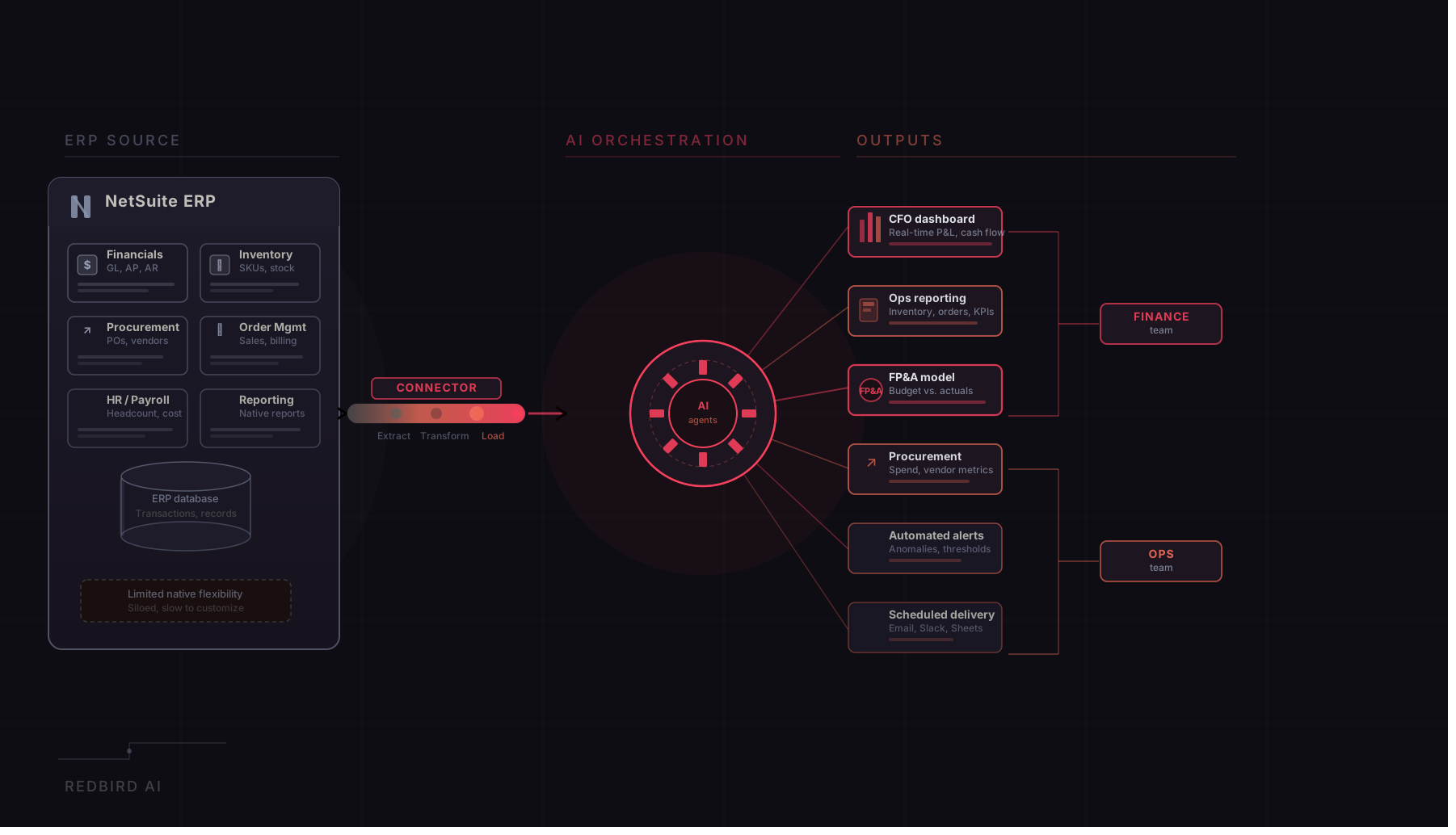
If your organization runs on NetSuite, a NetSuite connector is what closes the gap between your ERP and the tools your team uses to report, analyze, and act on that data. Think of it as a bridge. Your financial data, your order records, your customer and vendor transactions: all of it lives inside NetSuite. The connector is what lets your analytics platform, your reporting workflow, or your automation pipeline pull that data on demand, without anyone having to export a file, paste numbers into a spreadsheet, or wait on IT to run a query. For finance and operations teams that spend the first half of every week gathering data before they can do anything with it, a well-configured NetSuite connection can be the difference between reporting that runs itself and reporting that consumes the people who are supposed to be doing something more valuable.
What a NetSuite Connector Actually Does
When you set up a NetSuite connector, you are giving your analytics or automation platform permission to access your ERP and extract the records your workflows depend on. You authenticate with your NetSuite account, specify which modules, saved searches, or records are relevant (financials, inventory, sales orders, customers, vendors, or all of the above) and the connection handles the rest. From that point on, your platform can query NetSuite on a schedule you define without anyone having to log in, navigate menus, or trigger a manual export. The data flows directly into your reports, models, and pipelines as if it had always been there.
The best NetSuite connectors are built so that finance and operations analysts, not just developers or NetSuite administrators, can configure and manage them. You should be able to point to the records you need, define the refresh cadence, and start building a workflow without writing SuiteScript or submitting a support ticket. Once the connection is live, it should stay live: refreshing on schedule, picking up new transactions automatically, and alerting you if something falls out of sync. For a finance team that needs consolidated reporting ready by Tuesday morning, that reliability is not a nice-to-have. It is the whole point.
What Finance and Operations Teams Actually Need From a NetSuite Integration
The analysts who feel the absence of proper NetSuite integration most sharply are the ones sitting between the ERP and the business: finance managers building consolidation reports, FP&A analysts tracking actuals against budgets, operations leads monitoring fulfillment metrics. They know their way around NetSuite well enough to pull what they need, and they understand the data well enough to build and maintain the reports their organization depends on. What they are missing is not access. It is the layer that takes what they have access to and turns it into something reliable, automated, and consistent.
The problem shows up in the same pattern across industries. A finance team might pull revenue and expense data from NetSuite, cross-reference it with headcount data from an HR system, apply allocation logic that lives in a shared spreadsheet, and deliver a formatted management report every month-end close. A supply chain team might extract open purchase orders and inventory positions from NetSuite, layer in supplier lead times from a separate file, and produce a replenishment forecast in Excel for the operations review. Each step in those workflows is manual, each step introduces the possibility of error, and the entire process has to be reconstructed from memory whenever someone is out or leaves the team. The NetSuite connector is the entry point. The automation layer on top of it is what makes those workflows reliable and repeatable.
What This Looks Like in Practice
Consider a corporate finance team at a mid-sized consumer goods company. They close the books in NetSuite and maintain a set of recurring reports that pull actuals from the ERP, compare them against budgets maintained in Excel, and layer in commentary from business unit leads before formatting everything into a PowerPoint deck for the board. The ERP is the system of record. But the reporting workflow that sits on top of it is a patchwork of manual exports, vlookups, and slide-by-slide formatting that consumes three days of analyst time every month time that is nominally about reporting but is actually about data assembly.
When a team like this adds a proper automation layer on top of their NetSuite connector, the workflow changes fundamentally. The data pull from NetSuite runs automatically at close. The reconciliation logic (the joins to the budget file, the variance calculations, the segment roll-ups) is encoded once and applied consistently every period. The reporting agent formats the output directly into the board template, populating tables, charts, and commentary placeholders without anyone touching a slide. The analyst who used to spend three days assembling data now spends a few hours reviewing output, adding judgment, and preparing for the conversation. That shift from data assembly to data interpretation is where the value of a well-integrated NetSuite connection actually lives.
What to Look for in a NetSuite Connector
When evaluating a NetSuite connector or the platform it is part of, the first question to ask is whether it works with NetSuite alone or alongside every other source your workflows depend on. Most finance and operations reports pull from more than one place. You might have financials in NetSuite, headcount in Workday, pipeline in Salesforce, and budget models in Excel, all of which need to come together in a single deliverable. A connector that handles NetSuite but leaves the rest to manual exports has not solved the problem. It has just made one step slightly easier. Look for a platform where NetSuite is one of many integrated sources, not the only one.
The second question is what the platform does with the data after it pulls it. Getting data out of NetSuite is the starting point, not the finish line. You want a platform that can combine your NetSuite records with other sources, apply the business logic and allocation rules your reports depend on, and keep that logic consistent every time the report runs, without someone having to redo it manually each period. The goal is a workflow where the hard work of preparing data happens once, is saved, and runs automatically going forward.
Third, think about where the data ends up. Dashboards are useful, but most finance and operations teams also need reports in Excel, presentations in PowerPoint, or documents formatted for a specific audience. If the platform can take your NetSuite data, apply your business logic, and write the results directly into a formatted Excel file or board deck, that is a very different outcome from a tool that gets you as far as a dashboard and leaves the last mile to you.
Finally, consider how much technical support the platform requires to operate. A NetSuite integration that needs a developer every time you want to change the report structure, add a new field, or onboard a new data source will always be a bottleneck. The best platforms let analysts configure and modify their own workflows, ask questions of the data in plain language, and get answers without filing a ticket or waiting on someone with NetSuite admin access.
How Redbird Connects to NetSuite and the Rest of Your Data Ecosystem
Redbird is an agentic AI data platform that connects to NetSuite as part of a broader connectivity layer spanning ERP systems including SAP and Oracle, cloud data warehouses, SaaS platforms including Salesforce, Workday, Google Analytics, and advertising platforms, file-based sources, and legacy systems where no standard API exists. The NetSuite connector is one piece of a platform designed to automate the full data lifecycle: from ingestion and transformation through advanced analytics and production-ready output delivery.
When a user connects NetSuite to Redbird, they are not just enabling data access. They are bringing the ERP into an environment where specialized AI agents handle every step of the workflow that follows. A Data Collection Agent pulls from NetSuite and every other configured source. A Data Engineering Agent harmonizes the data, applies transformations, and ensures the output is clean and analysis-ready. An Analyst Agent computes custom metrics and applies business logic including period-over-period comparisons, budget variances, cost allocations, and segment roll-ups. A Reporting Agent assembles the final deliverable in the format the team actually uses, whether that is an Excel file, a PowerPoint presentation, or a live dashboard, using existing templates and standards. All of this runs on a scheduled cadence without manual intervention, and every step of every workflow is fully auditable.
What makes this architecture meaningful in practice is that it compresses timelines that typically take days into minutes. Teams that used to spend 60 to 80 percent of their analyst time on data preparation report dramatically less time doing that work after deploying Redbird. That time does not disappear. It moves upstream, into interpretation, variance analysis, and the kind of financial thinking that actually requires human judgment. Redbird works with organizations across financial services, media, consumer goods, and technology, including eight of the Fortune 50, in environments where the accuracy, auditability, and control requirements are among the most demanding in the world.
The Bottom Line
The right NetSuite connector is not just a data tap. It is the foundation of how your team gets from raw ERP data to finished, accurate reports. It should connect to the other sources your workflows depend on, keep your data current on a schedule, and sit inside a platform that handles the logic, the validation, and the delivery without manual work in between. The teams that get the most out of their ERP investment are the ones who have built, or found, an automation layer that handles everything that happens after the data pull: the joins, the transformations, the calculations, and the delivery of outputs that people can actually use. If your analysts are still spending the majority of their time preparing data rather than analyzing it, the question is not whether your NetSuite connection is working. It is whether the workflow built on top of it is working as hard as it should be.